 BuildCaptain
Blue Ocean is dead — what to use instead
As of July 2026 Blue Ocean receives no further security fixes or functionality updates. Here is what the Jenkins project recommends instead, and how to migrate off it without breaking your links.
 Written by Loris Siegenthaler · Maker of BuildCaptain
If you have run Jenkins for more than a few years, you remember the moment Blue Ocean appeared. Jenkins looked like a 2005 intranet, and here was a pipeline visualisation with real typography, a log you could actually read, and a URL you were not embarrassed to send to a colleague.
That was 2016. The Jenkins documentation now carries a blunt notice: "Blue Ocean will be deprecated in July 2026. It will not receive further security fixes or functionality updates." That date has passed. Blue Ocean is still installed on a great many controllers, mostly because nothing obviously replaced it. Something did. This is the honest version.
What Blue Ocean was
Blue Ocean was a complete alternative front end for Jenkins. CloudBees founded the project and open-sourced it into the Jenkins ecosystem; the first plugin release landed in September 2016 and version 1.0 shipped on 5 April 2017. It installed as an aggregator plugin — blueocean pulls in around twenty blueocean-* components — and lived in its own URL space under /blue, entirely separate from the classic UI.
What it gave you was genuinely ahead of its time:
- A pipeline visualisation that drew parallel branches as branches, not as a flat table.
- A log viewer scoped to the individual step, so a failure took two clicks instead of a Ctrl-F through 40,000 lines of console output.
- A personalised dashboard of the pipelines you had favourited.
- A graphical pipeline editor (its own plugin,
blueocean-pipeline-editor) that wrote yourJenkinsfileand committed it back to the repository. - First-class handling of multibranch projects and pull requests.
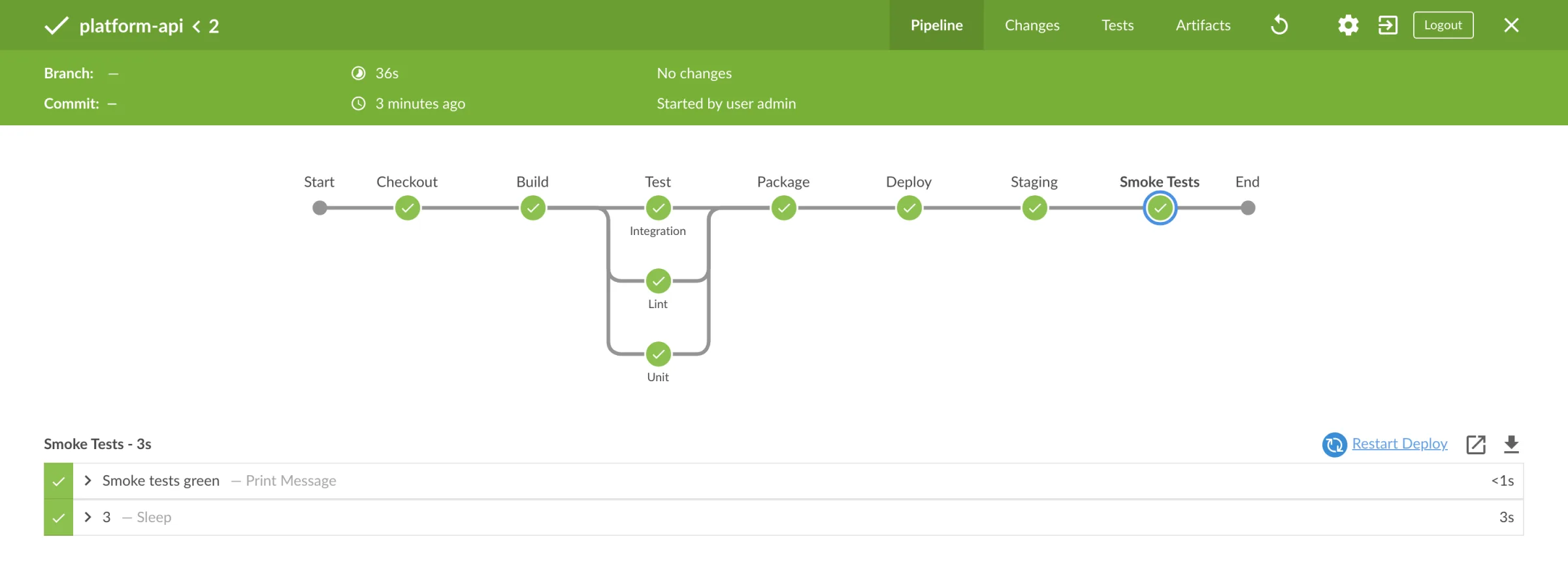
Why it stalled
Blue Ocean was a second front end, not a change to the first one. That is the whole story.
Every Jenkins plugin that contributes UI — and a large proportion of them do — contributes it to the classic UI. Blue Ocean could only render what its own code knew about, so any plugin that had not been specifically taught to it simply did not appear. In practice teams used Blue Ocean for the pipeline view and bounced back to the classic UI for configuration, credentials, plugin management, and half their reporting plugins. Two UIs, one permanently incomplete.
Underneath it was a large React application with its own build toolchain, dependency tree, and release cadence, maintained largely by one vendor. In November 2019 CloudBees told the Jenkins users list it no longer believed Blue Ocean was "the most appropriate vehicle" for the changes Jenkins needed, and that it would from then on "selectively address significant security issues and functional defects". That is maintenance mode, stated plainly, and it has been the status quo ever since — releases still trickle out, but nobody has shipped a feature in years. The July 2026 deprecation is the formal end of even the security work.
What ages badly if you keep it
Nothing switches Blue Ocean off. It will keep running. But an unmaintained front end of that size degrades in specific, predictable ways:
- No more security fixes. This is the one that matters. A large JavaScript application with a frozen dependency tree, explicitly excluded from future security work, sits inside your CI server's trust boundary.
- The pipeline editor is the weakest part. Declarative syntax has kept moving; the editor's understanding of it has not. "Opened it in the editor, saved, and it rewrote my pipeline" is a bad afternoon, and there is nobody left to fix the round-trip.
- Its dependency tree drags. Twenty-odd
blueocean-*plugins carry their own requirements, and they are a recurring source of version walls during upgrades. - It is invisible to everything new. Anything added to Jenkins or its plugins since Blue Ocean stopped moving does not exist inside
/blue.
The replacement: Pipeline: Graph View
The plugin the Jenkins project points to — in the same documentation note that announces the deprecation, and again in its April 2026 Plugin of the Month post, which calls it "a natural and lightweight successor" — is Pipeline: Graph View (pipeline-graph-view). It takes Blue Ocean's pipeline visualisation, the part everyone actually used, and renders it inside the classic Jenkins UI instead of in a parallel application.
Install it from Manage Jenkins → Plugins → Available and restart. Check your Jenkins version first: recent releases of the plugin require a fairly current core (2.541.3 at the time of writing), which is deliberate — it is built on the modern core UI rather than around it.
What you get:
- A Stages view on each build at
/job/<name>/<build>/stages/: the stage graph with sequential stages left to right, parallel branches as actual parallel paths, nested stages inside their parents, colour-coded by result. - Per-step logs in the same view. Click the failing stage, get the steps, expand the one that broke. That is the Blue Ocean workflow, restored.
- Live updates while the build runs.
- A job-level multi-build graph at
/job/<name>/multi-pipeline-graph/.
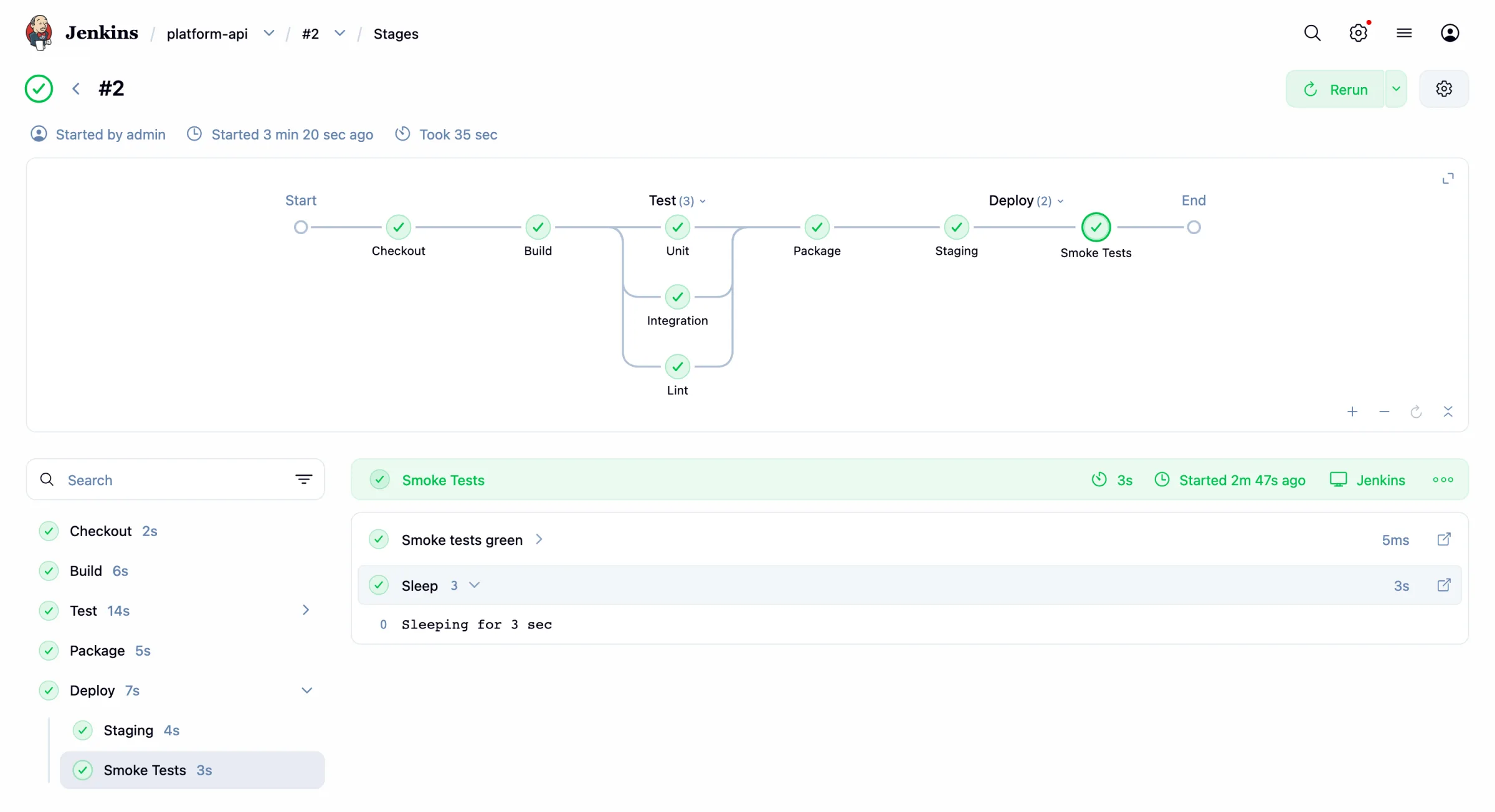
Because it lives in the classic UI, everything else on the build page — test reports, artifacts, coverage, whatever else your plugins contribute — sits next to the graph instead of one navigation away. That is exactly the problem Blue Ocean could never solve.
The older option: Stage View
Pipeline: Stage View (pipeline-stage-view) predates Blue Ocean, is still actively released, and does a different job: on the job page it renders stages as columns and recent builds as rows, each cell coloured by result with its duration.
As a trend view it is excellent. Ten builds side by side make it obvious that "Integration Tests" has been getting slower all month — something no single-build graph will ever show you. As a debugging view it is thin: parallel and nested stages flatten awkwardly, the per-stage log popup is minimal, and a thirty-stage pipeline produces a table you scroll sideways forever.
They are complements, not competitors. Stage View on the job page for the trend, Graph View on the build page for the detail. Plenty of instances run both, and that is the right answer.
What modern Jenkins gives you anyway
The other thing that changed is that the classic UI stopped being frozen in amber. Jan Faracik's two "Redesigning Jenkins" posts (March and July 2025) document the work: a proper design library replacing ad-hoc styling, the ancient YUI JavaScript toolkit disabled by default in 2.492.1 with roughly 85,000 lines of code deleted, LESS migrated to SCSS, and in 2.516.1 the top bar and breadcrumbs merged into a single header. There is a built-in theme picker now, dark theme included.
It is not a redesign that will make anyone gasp. But the gap that made Blue Ocean feel necessary — "the default UI is unusable" — is much narrower than it was, and the work is landing in the UI that every plugin already contributes to. That is the strategic difference, and it is why the project's answer to "what replaces Blue Ocean" is "the main UI, plus Graph View" rather than "here is another second front end".
Watching pipelines outside the browser
One thing no plugin solves: all of these live in a browser tab you have to remember to open. A page showing a red stage only helps if you are looking at it, which is why "what happened in this build" is well served and "is anything broken right now" is not.
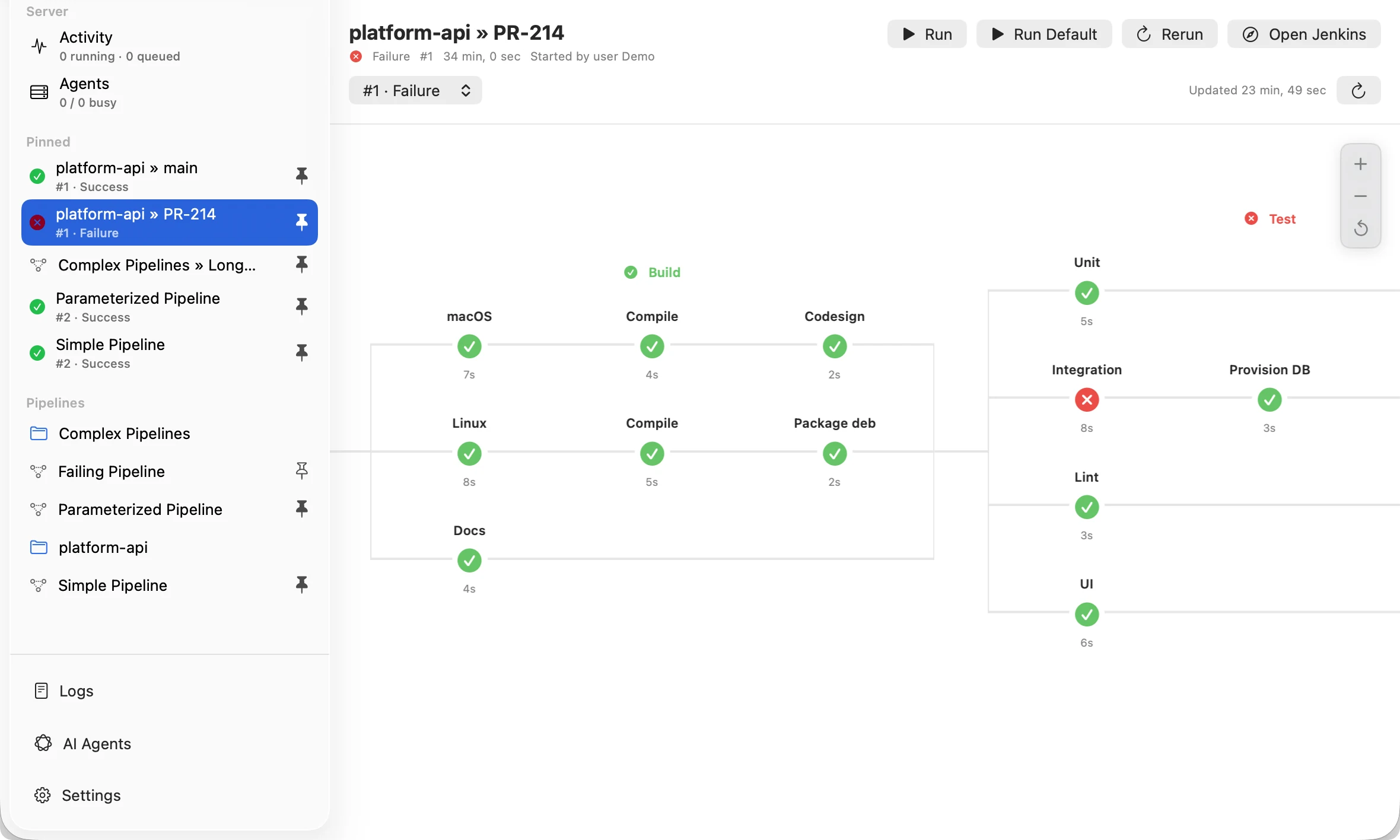
Disclosure, since this is our site: BuildCaptain is our app. It is a native macOS menu bar client for Jenkins — pin the pipelines you care about and their status sits in the menu bar, a native notification arrives when one fails or recovers, and one click opens the stage graph with nested and parallel stages, per-step logs, and run, stop, and rebuild controls in a native window. It reads pipeline structure through the Pipeline Graph View plugin, so it is a companion to the migration described here, not an alternative to it. If your problem is "the build page is bad", install Graph View. If your problem is "I keep finding out about failures too late", that is the one we built.
Migrating off Blue Ocean safely
Order matters, because blueocean is an aggregator and its components depend on each other.
- Install Pipeline: Graph View first and live with it for a week. Enable its display options (see the note above), then let the team confirm the views they relied on have an equivalent. This is also when you find out whose bookmark or script depends on a
/blueURL. - Find the pipeline-editor users. Anyone editing
Jenkinsfiles through Blue Ocean needs somewhere to go — an IDE, plus the built-in Pipeline Syntax snippet generator linked from every pipeline job, which builds correct step calls interactively. There is no graphical replacement, and pretending otherwise helps nobody. - Check what else
blueocean-display-urlis doing. That component implements the Display URL API, which decides which link Jenkins puts in notifications, emails, and commit statuses. With Blue Ocean installed those links point into/blue; removing it sends them back to the classic UI. Expected, but surprising if you have not thought about it — and worth announcing before someone reports "the Slack links changed". - Uninstall the aggregator, then sweep the leftovers. In Manage Jenkins → Plugins → Installed, filter on
blueocean. Remove the top-levelblueoceanplugin first; Jenkins refuses to remove anything another plugin still depends on, so work outside in and repeat the filter until the list is empty. A few shared transitive dependencies will legitimately stay behind. - Restart and read the logs. Manage Jenkins → System Log will say quickly if something was still bound to a removed extension point.
Back up first — JENKINS_HOME, or at minimum plugins/ and config.xml. Plugin uninstalls are not transactional, and being able to put the directory back is worth five minutes.
The URLs change
Blue Ocean's build URLs look like this:
/blue/organizations/jenkins/my-app/detail/my-app/42/pipelineThe fourth segment is the branch name for a multibranch project and the job name otherwise. The classic-UI equivalents are the ordinary job and build URLs, with the graph plugin's views hanging off them:
/job/my-app/42/                    # the build page
/job/my-app/42/stages/             # the stage graph and per-step logs
/job/my-app/multi-pipeline-graph/  # the job-level graph across builds
Folder-nested jobs repeat the job/ segment — /job/platform/job/my-app/42/ — where Blue Ocean flattened the path. Anything holding a saved /blue link (wiki pages, pinned chat messages, scripts hitting the Blue Ocean REST API under /blue/rest/) needs updating. Grep your internal docs for /blue/ before you pull the plugin, not after.
The honest summary
Blue Ocean was right about the problem and structurally wrong about the solution. A second front end could never keep up with an ecosystem of thousands of plugins that all contribute to the first one.
What replaces it is less exciting and considerably more durable: Pipeline: Graph View for the visualisation you actually miss, Stage View for the trend across builds, and a main UI being improved in place rather than routed around. Add whatever tells you about failures without your having to watch a tab, and you have every part of Blue Ocean anyone genuinely misses — in a shape that will still be maintained next year.